
TrendStudy
RealityMine Services LLCLifestyle
3.7183.00 Reviews
- Version
- 5.5.0
- Installs
- 100.00K
- Age Rating
- Everyone
Screenshots

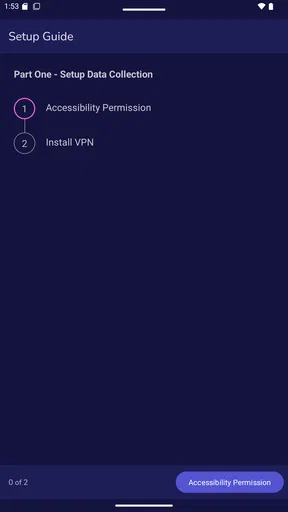
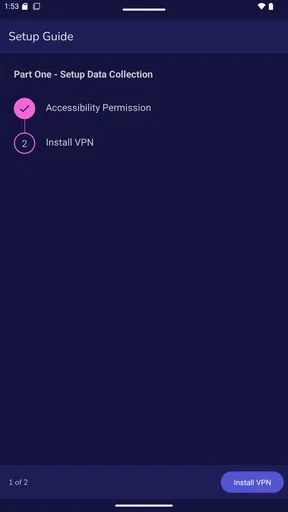
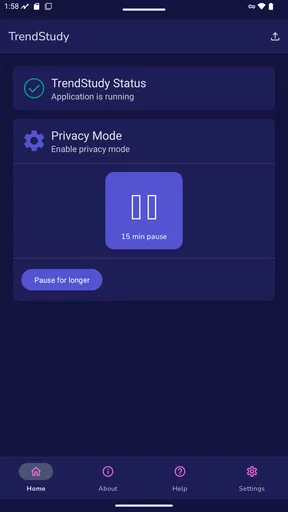
Our Review of TrendStudy
 Analysis by Appyee
TrendStudy is the kind of lifestyle app that makes sense only when you understand its purpose. I did not approach it as a general survey tool, a social network, or a daily utility with something to browse whenever I had a spare minute. It is an invite-only experience for people who have agreed to take part in market research, and that changes the way I judge it. Its value comes from responding to the right research activity at the right time, not from opening it repeatedly and expecting a full catalog of features.
That narrow role can be a strength. The app is free, carries an Everyone age rating, and is made by RealityMine Services LLC. It sits in the lifestyle area rather than productivity because participation is connected to everyday habits and consumer research. The current release is version 5.5.0, and the app requires Android 8.0 or later. On the store, it has a 3.7 average from around 750 ratings, with over 100 thousand installs, so it has reached a meaningful group of participants without looking like a mass-market app that tries to be useful to everybody.
How TrendStudy feels when connectivity is part of the experience
The first thing I would tell a potential user is that an invite-only research app is naturally more dependent on communication than a typical lifestyle tracker. An invitation, study instruction, questionnaire, or participation update needs to reach the phone, and your responses need a route back to the research service. That makes connectivity part of the practical experience even when the screen itself looks simple.
In a normal day, this means I would treat TrendStudy as something to check when I have a stable connection rather than something I would rely on in a place with uncertain reception. A quiet moment at home, a dependable office network, or a strong mobile-data connection is a better setting than an underground station or a crowded event where the signal keeps changing. The app may be perfectly easy to open in either place, but participation can become less predictable when communication with the service is interrupted.
The important distinction is between having the app installed and being ready to participate. Installation alone does not turn it into an always-available activity feed. Because access is invite-based, the useful content is tied to eligibility and research timing. If you are expecting an open marketplace of surveys, you may find the experience unusually quiet. If you have accepted a study and are waiting for a task, that same restraint can feel appropriate rather than disappointing.
I also found that connectivity affects confidence. When a response appears to go through immediately, I can move on without wondering whether I need to repeat it. When a connection hesitates, the sensible approach is to avoid tapping repeatedly and creating uncertainty about duplicate submissions. I would wait for the app to settle, then reopen it once the connection is reliable. That small habit matters more in research participation than it does in a casual entertainment app, because the value of the experience is tied to clean, timely answers.
Why the invite-only model changes expectations
Many lifestyle apps are designed around continuous engagement. They show a dashboard, reminders, trends, goals, or a history that gives me a reason to return even when nothing new has happened. TrendStudy should be judged differently. Its store summary describes it as an invite-only app for opted-in market research, and that wording is central rather than incidental. I would not install it expecting an independent source of advice, a personal journal, or a reward-driven routine.
The invitation also raises a practical question: who is it for? It is best suited to someone who knowingly opted into a research opportunity and is comfortable following study instructions through a phone. It is less suitable for someone who simply wants to explore the app before deciding whether to participate. The closed access model means the app’s usefulness begins with eligibility, not curiosity.
That makes it different from general survey platforms, where I can usually create an account and browse available tasks, and from habit trackers, where I control the content from the first launch. Those alternatives offer more immediate autonomy. TrendStudy’s advantage is that it can serve a defined research relationship without pretending to be a broad lifestyle companion. The trade-off is obvious: less choice for the participant, but potentially a more focused experience when an invitation applies to them.
Using it in real mobile situations
Imagine receiving a study invitation while commuting. I might read the notification on a bus, open the app briefly, and discover that the connection is too inconsistent to complete anything comfortably. My practical choice would be to note the task mentally, wait until I reach a stable connection, and then return to it without rushing. That is not as convenient as answering a short question in any location, but it is a realistic way to avoid partial submissions and frustration.
A second scenario is a busy family evening. If a study asks for attention while I am cooking or helping someone, I would not treat the prompt like an urgent message unless the app clearly presents a deadline. I would finish the immediate task, connect reliably, and give the research activity a focused response. This is one of the less obvious trade-offs of participation: a study may concern ordinary life, but completing it still requires a moment when I can read carefully and answer consistently.
On a phone, interruptions are common. Calls, low battery, switching between apps, and weak reception can all break concentration. I would therefore avoid starting a study activity when I know I am about to enter a low-signal area or when I have only a few seconds available. TrendStudy is more appropriate for deliberate check-ins than for hurried tapping between other tasks.
That advice may sound cautious, but it reflects the app’s purpose. A lifestyle research response is not something I want to complete while distracted simply because the interface happens to be on my phone. The mobile format makes participation accessible, yet it also places the responsibility for timing and attention on the participant.
What to do when a connection fails
Connectivity problems are most annoying when the app gives me no immediate sense of what happened to an action. If a screen loads slowly or a submission appears stuck, my first step would be to stop interacting with it. Repeated taps are rarely a good recovery method. I would check whether the phone has a usable connection, move to a more reliable location if needed, and then reopen the relevant activity.
If the app returns to the same task, I would read the screen carefully before answering again. If it shows a completed state, I would not try to recreate the response. This is a useful workflow for any research app: preserve the evidence of what the app is showing instead of assuming that a delay means failure. It reduces the chance of duplicate actions and keeps the response history clearer from my side.
The same principle applies after switching away from the app. On a phone with limited available memory or many active applications, returning to a task may not feel exactly like returning to a web page. I would expect to verify the current screen rather than assume that every field remained ready. Before leaving a study activity, I would also make sure I had reached a clear completion point if the interface provided one.
There is a human side to recovery as well. If a research task is time-sensitive, a failed connection can create anxiety because I may not know whether the issue is temporary or whether I have missed the opportunity. I would avoid guessing, keep the app updated to the current version, and use a stable connection for important participation. The version available now is 5.5.0, which is a useful reminder to check that the installed release is not outdated before blaming the network for every problem.
Still, this is where a general survey website or a more mature data-collection service might feel easier for some people. Browser-based systems often make it obvious whether a page loaded, while a dedicated research app can feel more opaque when communication is interrupted. TrendStudy’s focused purpose does not remove the ordinary frustrations of mobile connectivity; it simply makes them more noticeable because the app is a channel between participant and study.
Being thoughtful about mobile data and privacy habits
I would use TrendStudy with the same data awareness I apply to any app involved in market research. That does not mean assuming a particular permission, tracking method, or background behavior. It means making deliberate choices about when I participate, which connection I use, and whether I am comfortable with the study invitation before proceeding.
For routine participation, a trusted Wi-Fi connection can make sense when available, especially if an activity involves more than a few text responses. On mobile data, I would avoid starting a task when my connection is unstable or when I am close to a personal data limit. The key point is not that every action consumes a large amount of data; it is that uncertainty is a reason to choose a controlled setting rather than participate carelessly.
I would also read each consent screen and study explanation instead of treating the invite as a blanket approval for every future activity. Opting into market research is a personal decision, and the fact that the app is free does not remove the need to understand what a particular study asks of me. If the purpose, timing, or requested information does not feel comfortable, I would rather decline than answer without attention.
One useful habit is to separate the app’s technical convenience from the research decision itself. A quick notification can make participation feel automatic, but I would pause long enough to confirm that I recognize the invitation and understand the task. This is especially important when using the phone in public, where someone nearby might see a screen containing personal context. I would complete sensitive-looking activities in a private place, not because every study is necessarily sensitive, but because privacy is easier to manage when I choose the setting.
Compared with a habit tracker, TrendStudy gives me less control over what is collected because the study defines the interaction. Compared with a general survey app, the invite-only structure may reduce random browsing and make participation feel more purposeful. The trade-off is that I need to trust my own boundaries and read the study information carefully rather than assuming that the app’s lifestyle label tells me everything relevant.
Who will appreciate it, and who should skip it
I would recommend TrendStudy to a person who has deliberately opted into a market research project, checks their phone regularly, and can give responses in a stable environment. It is also a reasonable fit for someone who prefers a focused research channel over browsing a crowded list of unrelated surveys. The free price removes a financial barrier, and the Everyone rating makes it broadly accessible from an age-classification perspective.
I would not recommend installing it merely because it appears in the lifestyle category. Someone looking for meditation, exercise planning, food logging, personal goals, or a feed of lifestyle ideas will likely be better served by an app built around those activities. TrendStudy is not a substitute for those tools. Its value depends on receiving an invitation and being willing to participate in the kind of research that follows.
I would also suggest skipping it if you dislike app-mediated research, rarely have a dependable connection, or expect every mobile activity to work equally well while offline. The connectivity issue is not a minor detail here. If you regularly move through areas with poor reception and cannot return to tasks later, participation may become more effort than it is worth.
Another limitation is the lack of immediate control typical of open platforms. With a general survey service, I can often choose among topics or stop browsing when nothing interests me. With an invite-only study app, the relevant activity may arrive according to the research design rather than my preferred schedule. That can be a benefit for a well-defined project, but it may feel restrictive to people who want entertainment, variety, or instant rewards.
My connectivity verdict
After looking at TrendStudy as a real participant-facing tool rather than a conventional lifestyle app, I see a clear but limited role for it. The experience is shaped by the connection between an invitation, a mobile device, and a research task. When those three pieces line up, the app can be a straightforward way to take part without needing a desktop. When the signal is unreliable or the user expects an open-ended app, the same design can feel narrow and inconvenient.
My best advice is to treat it like an appointment rather than a feed. Open it when you can concentrate, use a dependable connection, read the study information before agreeing, and avoid repeated taps when a response appears delayed. Those habits address the most realistic friction points without inventing promises about offline use or background behavior.
RealityMine Services LLC has positioned this as a specialized research app, and the focused approach is more honest than trying to present it as a universal lifestyle tool. I would keep it installed if I had accepted a relevant invitation and was comfortable with the study terms. I would remove it from consideration if I had no invitation or wanted a self-directed app with visible daily benefits.
In short, TrendStudy is worth using when participation itself is your goal. It is free, available for Android 8.0 and later, and supported by a sizeable installed audience, but those facts matter less than the invitation that unlocks its purpose. For the right participant, it can fit neatly into ordinary mobile life. For everyone else, a conventional survey platform or a genuinely interactive lifestyle app will be the more useful choice.
Verdict
Strengths of TrendStudy
- Clean interface makes lessons easy to navigate.
- Study materials can be accessed conveniently on mobile.
- Useful for reviewing topics during short breaks.
- Progress tracking helps maintain learning motivation.
- Suitable for students with different study routines.
Limitations of TrendStudy
- Some content or features may require a paid subscription.
- Learning quality can vary depending on available course materials.
- Notifications may become distracting if not customized.
- Offline access may be limited for certain lessons.
- The app may not replace personalized teacher support.
Similar Picks in This Category
View All
SmartThings
Samsung Electronics Co., Ltd.4.6

Google Home
Google LLC4.0

Pinterest4.2

Astrotalk - Talk to Astrologer
Astrology & Horoscope4.7

My Verizon
Verizon Consumer Group4.5

Samsung Wallet (Samsung Pay)
Samsung Electronics Co., Ltd.4.1
Frequently Asked Questions
What is TrendStudy and what can I use it for?
TrendStudy is an educational app designed to help users organize learning materials, review important topics, and follow study-related trends or resources in one place. Depending on the version available in your region, it may include lessons, summaries, quizzes, progress tracking, or recommendations. Before downloading, check the current store description because the exact tools and supported subjects can change with updates.
Is TrendStudy suitable for beginners and advanced students?
TrendStudy may be useful for different learning levels, but its suitability depends on the subjects, courses, and difficulty settings currently offered. Beginners should look for introductory explanations, guided lessons, and basic quizzes, while advanced students may prefer revision tools and more challenging content. Review the available topics and screenshots before installing to confirm that the app matches your academic needs.
Does TrendStudy require an internet connection?
Some TrendStudy features may require an active internet connection, especially account registration, content synchronization, online lessons, recommendations, or progress backups. Certain materials might be available offline after they have been downloaded, but offline access should not be assumed for every course or activity. If you plan to study while traveling, verify the app’s offline capabilities and data requirements in the official store listing.
Is TrendStudy free to download and use?
TrendStudy may be free to install while offering optional purchases, subscriptions, advertisements, or premium study content. Free access can vary depending on the platform, country, and promotional period. Before starting a trial or entering payment details, carefully review the subscription terms, renewal conditions, and cancellation instructions. This helps you understand which features are included without payment and which require an upgrade.
What privacy and account permissions does TrendStudy request?
When you use TrendStudy, the app may request information such as an email address, profile details, learning activity, or device permissions needed for notifications and synchronization. The exact data collection practices depend on the current privacy policy and app version. Before creating an account, read the developer’s privacy documentation and check whether optional permissions can be denied without affecting the main study features.
